How LiftTrack updates a workout from your session
When a session differs from the plan, LiftTrack offers to copy your weights, reps and sets into the saved workout, so next time starts where you left off.
On this page
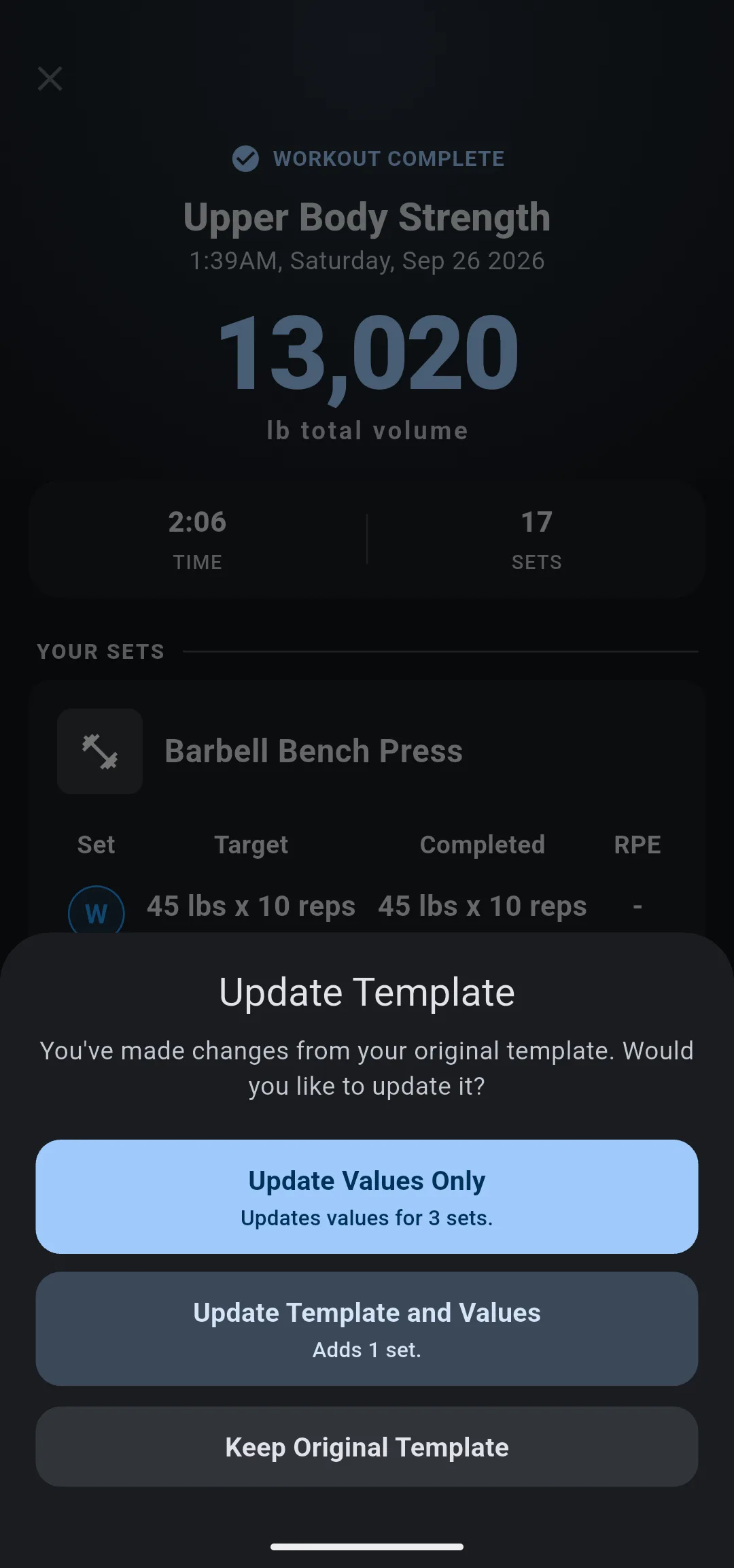
LiftTrack compares each session with the workout it came from. If you lifted a different weight, did different reps, or added or skipped sets, the review ends with Update Template. Nothing in the workout changes until you choose an update there.
When does LiftTrack offer the update?
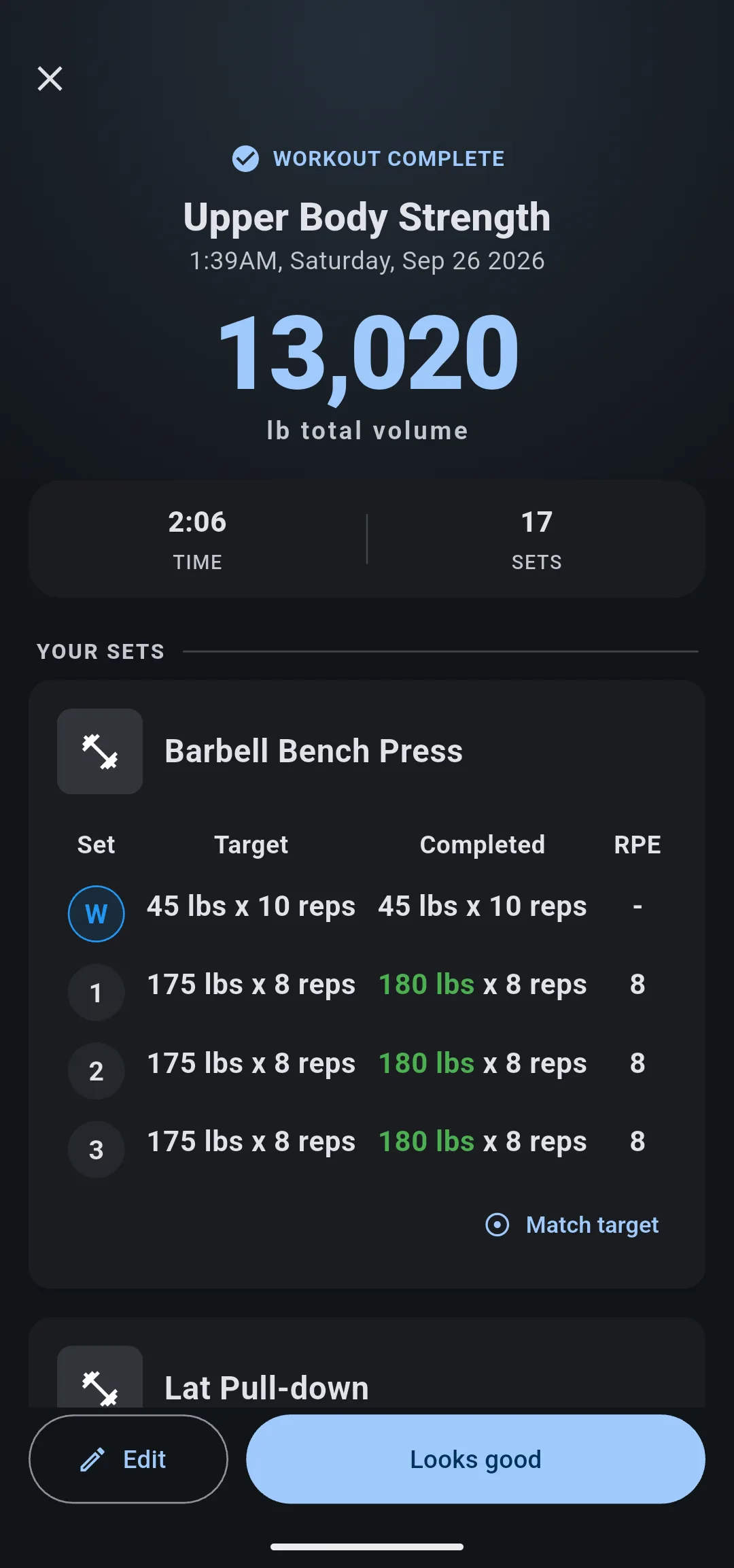
The offer appears after a session from a LiftTrack workout, whether you did it on your Garmin or tracked it on your phone. It comes at the end of the review: on the Workout Complete screen, tap Looks good.
LiftTrack offers it only when all of these are true:
- The session differs from the workout in at least one set.
- You haven’t edited the workout since the session started. The update would otherwise undo your edit, so LiftTrack stays quiet.
- LiftTrack has the version of the workout the session was based on. Workouts from older app versions sometimes don’t have it.
To correct a wrong weight the watch recorded, tap Edit on Workout Complete first. The offer compares the session as you leave it.
What counts as a change?
LiftTrack matches each exercise in the session to the same exercise in the workout, then matches sets by position. Warmup sets are matched with warmup sets and working sets with working sets, so one extra warmup never shifts your working sets.
| In the session | Counts as |
|---|---|
| A different weight on a set | A value change |
| Different reps on a set with a rep target | A value change |
| A set you added | A change to the workout’s sets |
| A set you didn’t do | A change to the workout’s sets |
| An exercise you added or skipped | A change to the workout’s exercises |
| A different time on a timed set | Not a change |
| A different RPE | Not a change |
| A different weight on a set in % of TM | Not a change |
Weights are compared in your unit, rounded to the nearest 0.5, so a tiny difference from converting between lb and kg never counts.
What does each choice change?
Update Template shows only the choices that apply, each with a line that counts what it does.
- Update Values Only copies your weights and reps onto the matching sets. The exercises and the number of sets stay as they are. It shows, for example, Updates values for 3 sets.
- Update Template and Values makes the workout match the session: its exercises, in the order you did them, with the sets and values you did. It shows what it adds and removes, such as Adds 1 set. When it would remove sets or exercises, the choice is shown in red.
- Keep Original Template leaves the workout as it is.
| Update Values Only | Update Template and Values | Keep Original Template | |
|---|---|---|---|
| Copies your weights and reps | Yes | Yes | No |
| Adds or removes sets and exercises | No | Yes | No |
| Puts exercises in the order you did them | No | Yes | No |
| Keeps rest, supersets, notes and percentages | Yes | Yes | Yes |
Update Template and Values keeps each exercise’s settings: rest times, supersets, notes and % of TM. A set in % of TM keeps its percentage and takes only your reps. An exercise you added in the session starts with no notes and no rest time of its own.
For example, Upper Body Strength plans Barbell Bench Press at 3 sets of 175 lb × 8 and lat pulldowns at 3 sets of 120 lb × 10. You bench 180 lb on every set and add a fourth set of pulldowns:
| Choice | Barbell Bench Press next time | Lat pulldown next time |
|---|---|---|
| Update Values Only | 3 sets of 180 lb × 8 | 3 sets of 120 lb × 10 |
| Update Template and Values | 3 sets of 180 lb × 8 | 4 sets of 120 lb × 10 |
| Keep Original Template | 3 sets of 175 lb × 8 | 3 sets of 120 lb × 10 |
After an update, the workout saves like any other edit. If your Garmin is connected, LiftTrack sends the updated workout to Garmin Connect again, and your watch gets it on its next sync. If the save fails, the app shows Could not update your template. Try again.
Tapping outside Update Template takes you back to the review, where you can edit the session and tap Looks good again.
What happens in a workout with progressions?
In a workout with progressions, the offer moves to the Next time step, under Without a progression. It covers only the exercises that have no progression, because a progression already decides the targets for the rest. A line names the exercises that differ, such as Dumbbell Biceps Curl doesn’t match your template.
The same three choices appear as options. Update Values Only is chosen for you when it applies; Update Template and Values never is, because it can remove sets.
Your choice applies when you tap Accept. Skip leaves the workout as it is.
Here LiftTrack checks each exercise on its own: an exercise you edited since the session started is left out of the offer, and the others are still offered.
Why does LiftTrack ask instead of updating on its own?
A session is often a one off: a light day, a skipped set, a machine that was taken. Copying every session into the workout would plan your next session around a bad day. So LiftTrack changes the workout only when you say what you did is the new plan.
The trade off is one more decision after each session that differs. If you want the weight to go up on a fixed rule without deciding each time, add a progression to the exercise instead.
What you can change
- Build a workout: edit the weights, sets and exercises of a workout by hand.
- Set up 5/3/1: plan sets in % of TM, which keep their percentage through every update.