How progressions work
Progressions in LiftTrack raise the weight or reps of an exercise after a session where you hit every working set, so each workout starts at the right load.
On this page
- When does a progression move?
- What does Linear progression change?
- What does Double progression change?
- How does Double progression handle sets that differ?
- How do you accept or skip the change?
- Which workouts does a change update?
- Why does LiftTrack wait for every set?
- Which exercises can have a progression?
- Progression settings
- What you can change
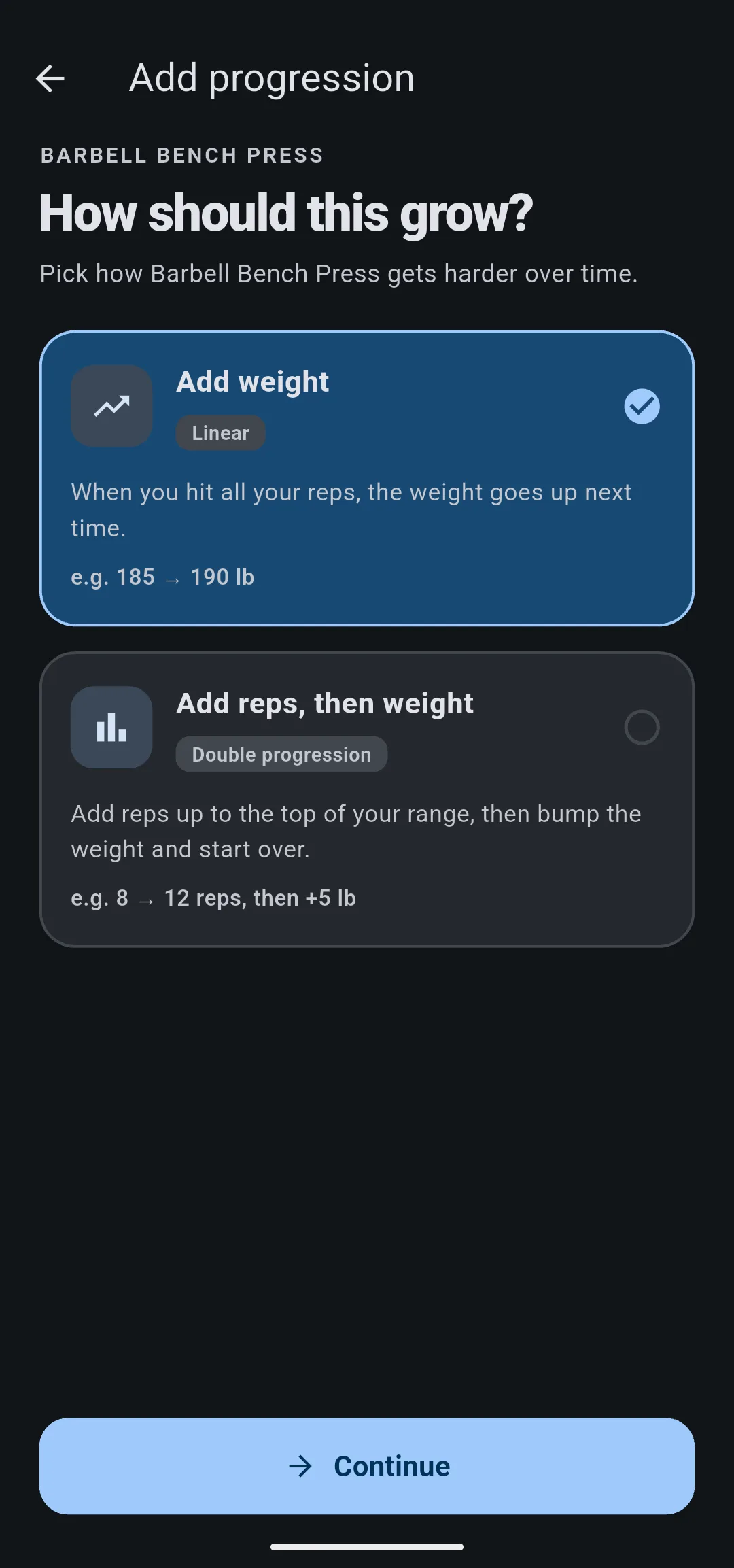
A progression is a rule on one exercise in a workout. When you hit every working set at its planned weight and reps, LiftTrack proposes new targets for next time, and you accept or skip them after the session. There are two types: Linear adds weight, and Double progression adds reps up to the top of a range, then adds weight.
When does a progression move?
A progression moves only when every working set meets its target: at least the planned weight and at least the planned reps. One set short on reps or weight, or one working set left out, and the exercise is held with the same targets next time.
Warmup sets never count: they can’t hold you back or move you up, and a progression leaves them as they are. Doing more than planned counts as hitting the target.
What does Linear progression change?
Linear progression adds a fixed weight, Add each time, to every working set when you hit all your reps. The reps stay the same.
For example, Barbell Bench Press is planned at 3 sets of 175 lb × 8, with Add each time set to 5 lb:
| You did | Result | Next time |
|---|---|---|
| 175 × 8, 175 × 8, 175 × 8 | Every set hit | 180 × 8 on all 3 sets |
| 175 × 8, 175 × 8, 175 × 7 | One rep short | Held at 175 × 8 |
| 185 × 8, 185 × 8, 185 × 8 | Every set hit | 180 × 8 on all 3 sets |
A progression adds to the weight the workout planned, not the weight you lifted, so one strong day does not jump your targets ahead. To plan the heavier weight from now on, edit the workout.
What does Double progression change?
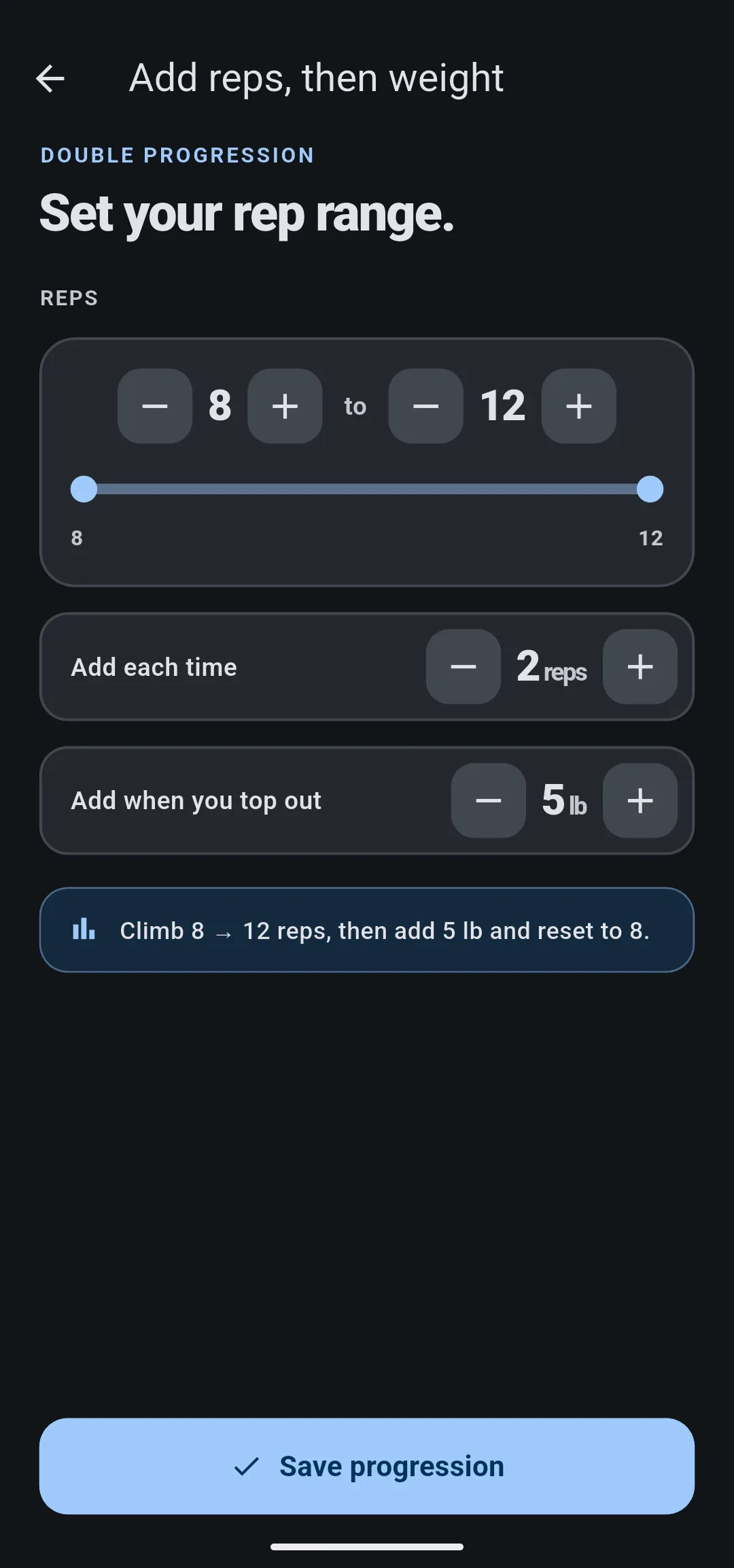
Double progression adds reps each session until every working set reaches the top of your rep range. Then it adds weight and sets every working set back to the bottom of the range. It has three settings: the Reps range, Add each time (reps) and Add when you top out (weight).
For example, Barbell Bench Press is planned at 3 sets of 175 lb × 8. The range is 8 to 12, with 2 reps each time and 5 lb when you top out:
Sessions 1 and 2 add 2 reps. Session 3 tops out at 12, so the weight goes up 5 lb and the reps go back to 8.
Reps never climb past the top of the range: a set planned at 11 with 2 reps each time goes to 12. The weight goes up only when every working set reached the top, counting the reps you did. If you planned 10 and did 12 on every set, the exercise tops out that session.
How does Double progression handle sets that differ?
Double progression moves the working sets of an exercise together. Each set gets the same rep increase, and when the exercise tops out, each set gets the same weight increase. Sets planned at different weights keep their spread: a ramp of 135, 155 and 175 lb × 12 becomes 140, 160 and 180 lb × 8.
Sets that start at different reps climb on their own, each capped at the top of the range. With a range of 8 to 12 and 2 reps each time, sets planned at 12 and 10 go to 12 and 12. The weight goes up only once the last set catches up, and then every set goes back to 8.
How do you accept or skip the change?
After a session, the review ends on Next time. Each exercise with a progression shows as leveling up, with the change such as +5 lb or +2 reps, or as held. Tap an exercise to switch it between leveling up and held.
Accept applies the changes you left on. Skip keeps your current targets for every exercise. Nothing in the workout changes until you tap Accept.
Tapping a held exercise applies its change anyway, for a session you count as a success even though one set came up short.
Which workouts does a change update?
A progression belongs to an exercise in a workout, and more than one workout can share it. A copy made with Duplicate keeps the same progressions as the original, so accepting a change after either one updates both.
Why does LiftTrack wait for every set?
LiftTrack raises your targets only on a clear signal: every working set done as planned. The rule gives the same answer every time for the same session. A miss costs you one more try at the same targets, not a harder session you weren’t ready for.
The trade off is that a progression looks only at weight and reps, never at how hard the sets felt. If you train by RPE, raising the weight after a set that felt light is up to you.
Which exercises can have a progression?
| Exercise | Progression |
|---|---|
| Sets with weight and reps | Linear or Double progression |
| Timed sets | Not available: Unavailable for timed sets |
| Weights set as a percentage of a training max | Not available: Unavailable with % of TM |
The first progression you add to a workout with other rep based exercises opens Apply Progression to All Exercises?. It offers every eligible exercise its own progression with the same settings.
Progression settings
| Setting | Type | Default | Range |
|---|---|---|---|
| Add each time | Linear | 5 lb (2.5 kg) | From 2.5 lb (1 kg), in steps of 2.5 lb (0.5 kg) |
| Reps | Double progression | 8 to 12 | Bottom of 1 or more, top at least 1 rep higher |
| Add each time | Double progression | 2 reps | 1 rep up to the size of the range |
| Add when you top out | Double progression | 5 lb (2.5 kg) | From 2.5 lb (1 kg), in steps of 2.5 lb (0.5 kg) |
To change these settings or remove a progression, tap Progression on the exercise card in Edit Workout. In Edit Workout, the options icon has Remove All Progressions, which removes every progression in the workout.
What you can change
- Add a progression to an exercise: choose the type and settings, copy them to every exercise in the workout, or remove a progression.
- Build a workout: plan the weight and reps a progression starts from.
- Set up 5/3/1: use training maxes instead of progressions for a percentage based program.


