How training maxes work
A training max is one reference weight per exercise. Sets in % of TM calculate their weight from it, so changing it updates every workout that uses it.
On this page
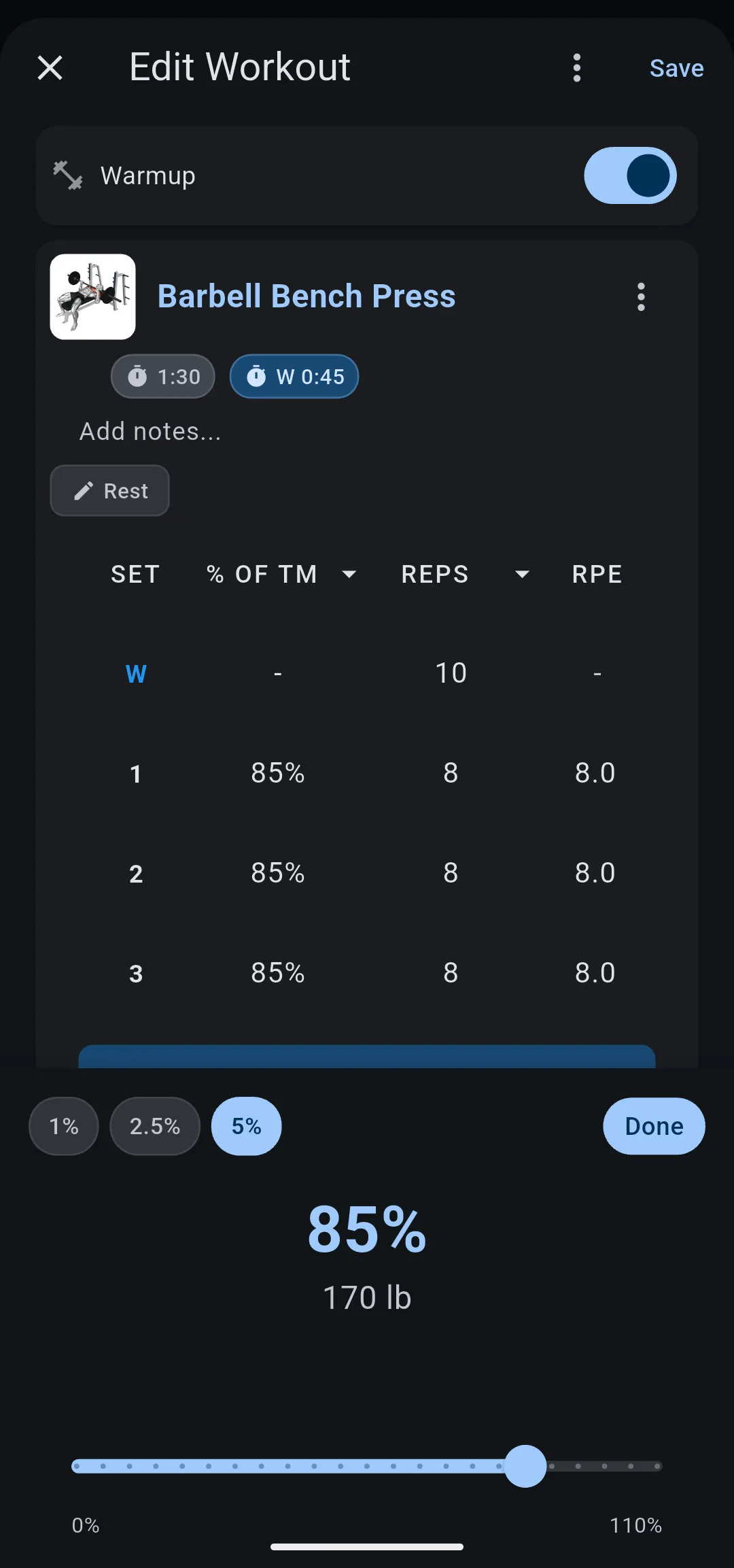
A set in % of TM stores a percentage, not a weight. LiftTrack multiplies your training max for that exercise by the percentage and rounds the result. That is the weight you see on your phone and your watch.
What is a training max for?
Percentage based programs such as 5/3/1 write each set as a percentage of a training max instead of a fixed weight. A training max in LiftTrack is that reference weight: one number per exercise that every percentage is calculated from.
LiftTrack uses whatever weight you enter. How you choose it, for example a set share of your one rep max, is up to the program you follow.
How does a percentage become a weight?
The weight is your training max times the percentage, rounded to the nearest step of Weight rounding in HomeProfileWorkout Settings. The steps are 2.5, 5 or 10 lb, or 1, 2.5 or 5 kg. Until you choose one, LiftTrack rounds to 5 lb (2.5 kg).
For example, Barbell Bench Press has a training max of 225 lb and Weight rounding is 5 lb:
| Set | Exact weight | Weight in the workout |
|---|---|---|
| 65% | 146.25 lb | 145 lb |
| 75% | 168.75 lb | 170 lb |
| 85% | 191.25 lb | 190 lb |
Rounding keeps every set on a weight you can load with real plates.
The percentage picker runs from 0% to 110%, in steps of 1%, 2.5% or 5%, and shows the calculated weight as you move it. Percentages over 100% are for sets heavier than your training max. When you set a percentage, the sets after it that are empty or had the same percentage take the new value too.
Which workouts use a training max?
Each exercise has one training max, shared by every workout. Set 225 lb for Barbell Bench Press once, and each workout where Barbell Bench Press is in % of TM calculates from 225 lb. A different exercise, such as Incline Dumbbell Bench Press, has its own training max.
Only exercises you switch to % of TM use the training max. The same exercise in another workout, left in lb or kg, keeps its fixed weights.
Switching an exercise to % of TM clears its weights, so you enter a percentage for each set. If the exercise has no training max yet, LiftTrack asks for one first. Switching back to lb or kg clears the weights again.
What happens when you change a training max?
When you change a training max, LiftTrack recalculates every workout that uses that exercise in % of TM. The percentages stay the same, and each weight follows the new training max.
For example, you raise the Barbell Bench Press training max from 225 lb to 235 lb at the end of a cycle:
| Set | Before, at 225 lb | After, at 235 lb |
|---|---|---|
| 65% | 145 lb | 155 lb |
| 75% | 170 lb | 175 lb |
| 85% | 190 lb | 200 lb |
If your Garmin is connected, LiftTrack sends each updated workout to Garmin Connect again, and your watch gets the new weights on its next sync.
What you lift in a session never changes a set in % of TM. When LiftTrack updates a workout from a session you did, those sets keep their percentage.
Why doesn’t a training max go up on its own?
Programs that use a training max decide when it goes up, often once per cycle of several weeks, not after every session. So LiftTrack changes a training max only when you do, and one change moves every workout that uses it.
The trade off is that raising it is your job. For weights that go up automatically after sessions where you hit every set, use progressions instead. An exercise uses one or the other, never both.
| Progression | Training max | |
|---|---|---|
| What you set | A rule on one exercise in a workout | One weight per exercise, shared by every workout |
| Sets are written as | A weight in lb or kg | A percentage of the training max |
| The weight goes up | After a session where every working set hit its target, when you accept | Only when you change it |
| One change updates | The workouts that share the progression | Every workout with that exercise as a percentage |
Choose
A progression
if you:
- want the weight or reps to go up after each session that hits its target
- plan your sets in lb or kg
Choose
A training max
if you:
- follow a percentage based program such as 5/3/1
- raise your weights once per cycle, not after each session
Features with % of TM
| Feature | With % of TM |
|---|---|
| Progression | Not available: Unavailable with % of TM. An exercise with a progression can’t switch until you remove the progression. |
| Warmup sets | Not available: Add Warmup Sets shows Unavailable with % of TM |
| Timed sets | No training max: Set Training Max shows Unavailable for timed sets |
| Editing a past session | Weights only, in lb or kg |
| Importing a shared workout | Uses your training max, or creates one from the sender’s weights if you have none |
The Training Maxes screen
HomeProfileTraining Maxes lists every exercise with a training max and its weight.
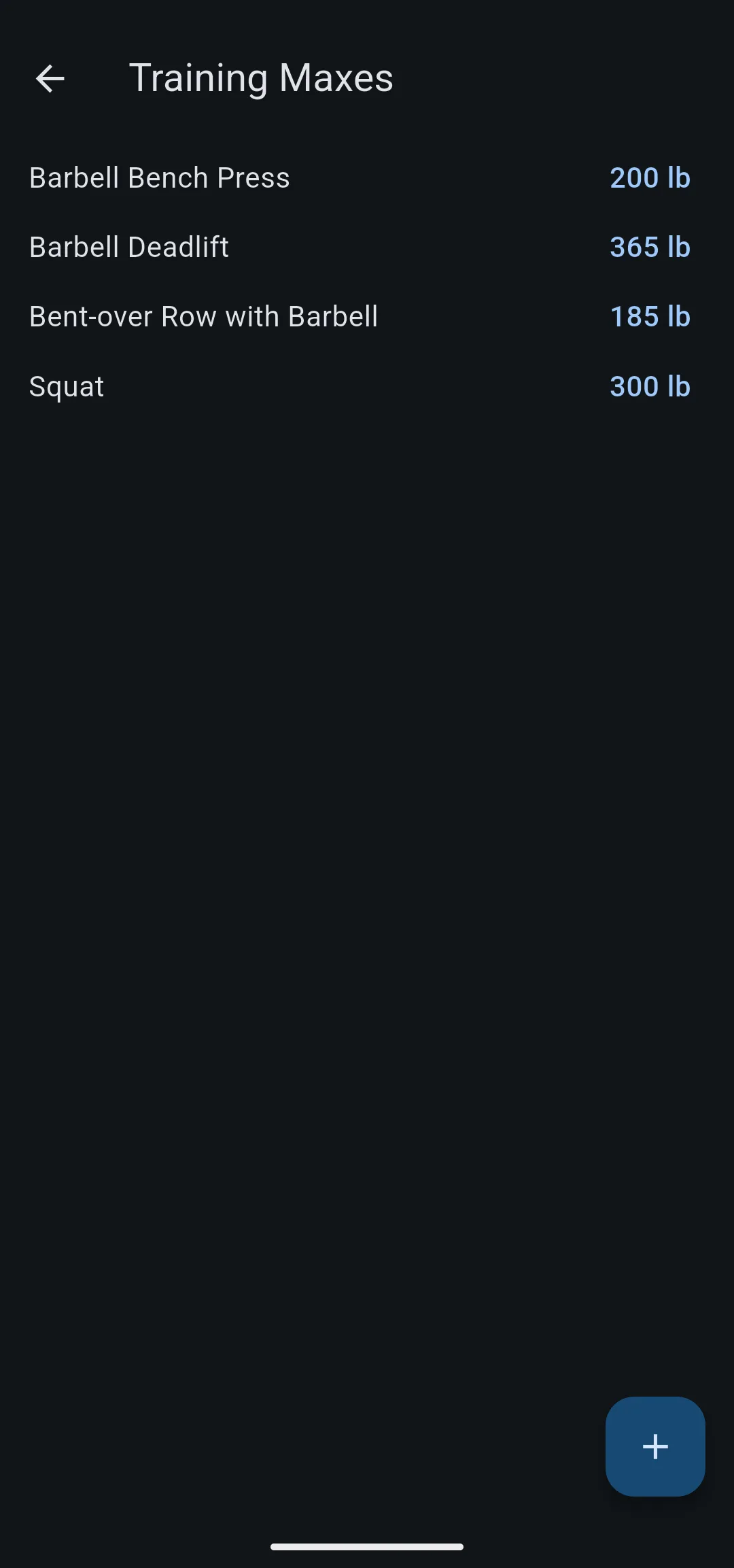
| On the screen | What it does |
|---|---|
| The weight | Opens Set Training Max to change it |
| The exercise name | Opens the exercise |
| The add button | Adds a training max: choose an exercise, then enter the weight |
| Swipe a row | Hide or Unhide it. A hidden training max still works in your workouts. |
| The visibility icon | Shows hidden training maxes. It appears once you hide one. |
In Edit Workout, the options icon on an exercise card also has Set Training Max.
What you can change
- Set up 5/3/1: set training maxes and build the program’s workouts in % of TM.
- Build a workout: add the exercises and sets you then switch to % of TM.


