What the Training screen shows
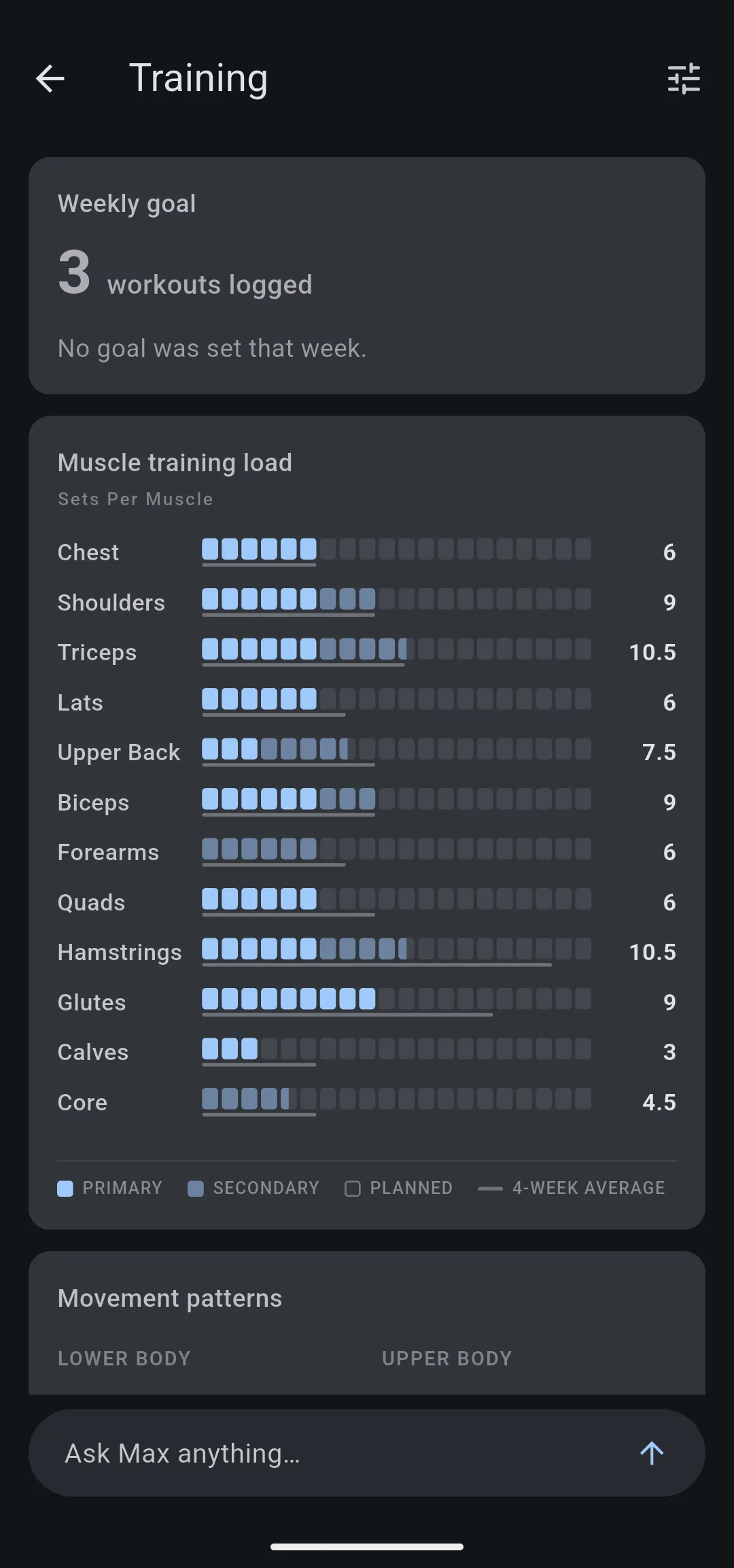
The Training screen counts your weekly training volume as sets per muscle next to your four week average, plus the movement patterns and rep ranges you trained.
On this page
The Training screen reads one Monday to Sunday week of your sessions. Muscle training load credits each working set to every muscle the exercise trains: a full set for a primary muscle, half a set for a secondary one. Each muscle’s row also marks your own four week average, and Movement patterns and Training focus show what kind of work the week was.
Where do you open the Training screen?
The Training card on the Home tab sums up the week you are looking at on Home and opens the Training screen for that same week. Page back to an earlier week on Home and both show that week; a future week has no card.
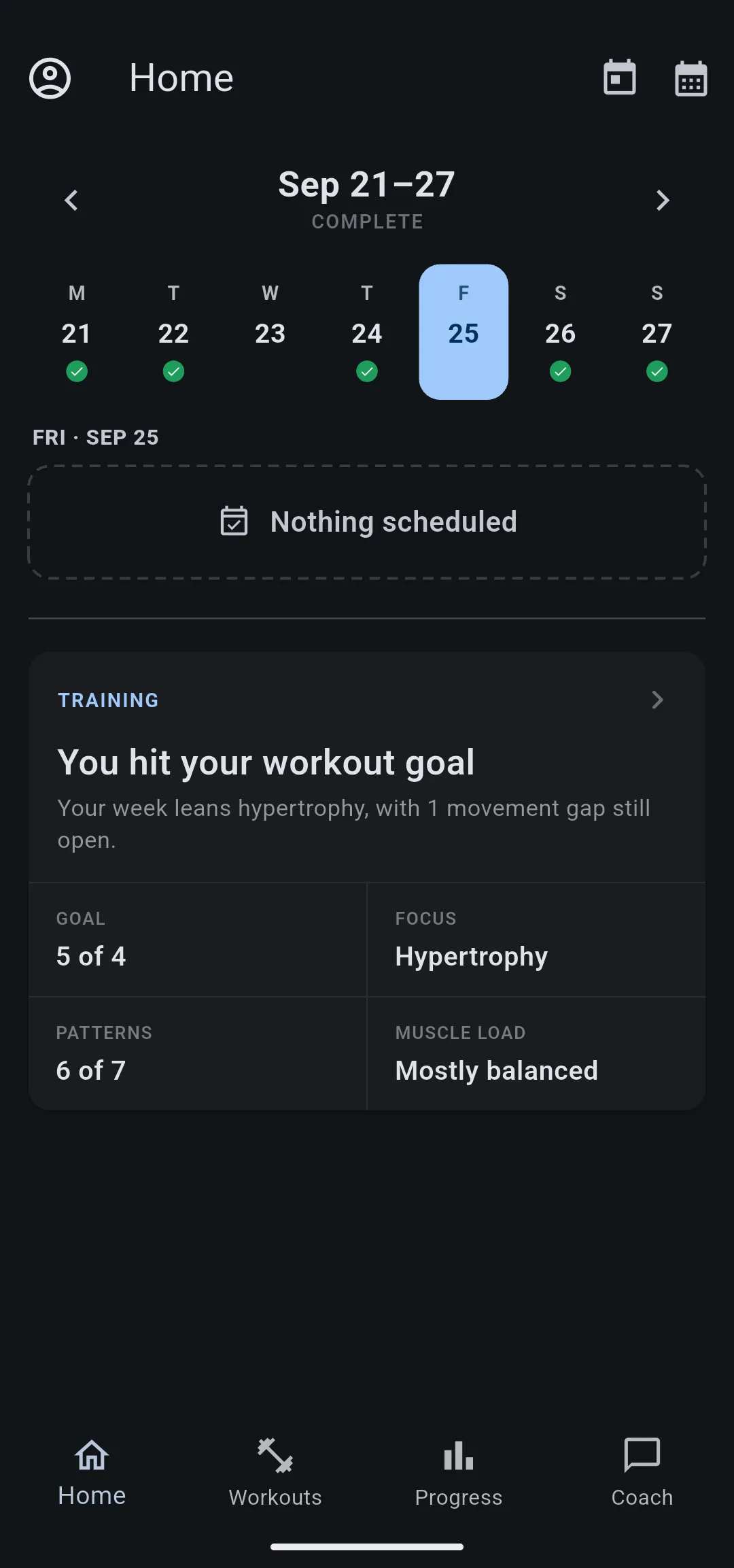
The card’s four numbers match the screen’s four cards. Muscle load compares the sets on your upper body muscles with those on your legs: Balanced, Mostly balanced, Upper-body heavy or Lower-body heavy. A week of core work only reads Core focused.
The Training screen is part of Premium. Without Premium it shows your real Weekly goal and a preview of the other three cards filled with example data, marked Premium preview · Example data.
How are sets per muscle counted?
Each working set counts once for every muscle the exercise lists: 1 set where the muscle is a primary mover, 0.5 where it is a secondary mover. Warmup sets never count, and the week always runs Monday to Sunday.
For example, in the Sep 14 to 20 week Triceps reads 10.5. That is 6 sets where the triceps were a primary muscle, plus 9 sets where they assisted, worth 4.5. The bright slots are the primary sets and the dimmer slots the secondary ones, so you can count both.
- 1 Primary sets. Bright slots count 1 set each.
- 2 Secondary sets. Dim slots count half a set each.
- 3 Four week average. The line under each row marks a normal week for you.
The card has 12 rows: Chest, Shoulders, Triceps, Lats, Upper Back, Biceps, Forearms, Quads, Hamstrings, Glutes, Calves and Core. Traps count toward Upper Back, and obliques and lower back toward Core. Hip abductor and adductor work counts toward no row, because crediting it to Glutes or Quads would overstate those muscles.
An exercise counts when LiftTrack knows its muscles: every exercise in the LiftTrack catalog, and every custom exercise by the muscles you chose for it.
Why does a secondary set count as half?
Half credit shows work that a push, pull and legs count hides. A bench press is a chest exercise, but it also works your triceps. Counting it as one chest set and nothing else leaves a pressing week looking light on arms while your triceps did plenty.
Full credit would go too far the other way: a secondary muscle does less of the work, and every press would count as a full triceps set. Half a set sits between the two. The trade off is that it is a fixed rule: a close grip press, which leans on the triceps more than most, still counts them at half.
What does the four week average show?
The line under each row marks that muscle’s average over the 4 weeks before the week shown. It answers “is this normal for me?” with your own training, not a target someone else set.
The average divides by the weeks you trained, not by 4, so a week off does not pull every line down. It appears once at least 2 of those 4 weeks have a session. A muscle with no sets in those weeks has no line.
In the same week, Hamstrings reads 10.5, but its line reaches well past the filled slots: that week gave your hamstrings less work than a normal week for you.
Why do the rows have 12, 16 or 20 slots?
Every row uses the same scale, so a short row means less work than a long one. The scale is 12, 16 or 20 slots, set by the busiest row or the highest average of the week.
The scale is never shorter than 12 slots. A light week, such as a deload, looks light instead of stretching 4 sets across the whole row. Past 20 the row stays full and its number reads 20+.
What do movement patterns and training focus show?
Movement patterns shows coverage, not volume. Each of 7 patterns is either trained that week or not: one working set counts the same as ten. A pattern you skipped has a dashed outline, and the card ends with a count such as 6 of 7 trained. Custom exercises count toward the pattern you gave them.
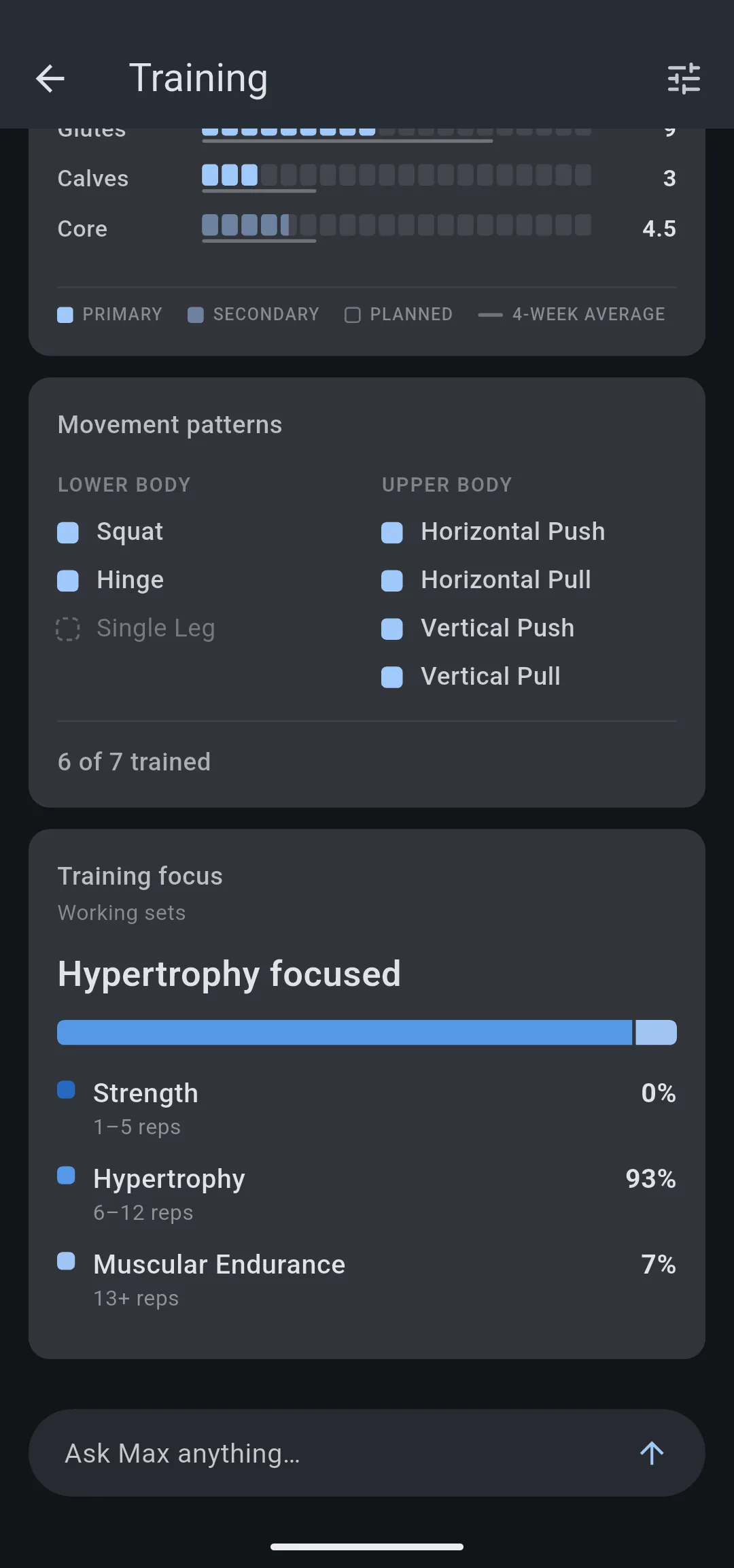
Training focus sorts every working set by its reps. When one rep range holds at least 45% of the sets, the card names it, such as Hypertrophy focused; otherwise it reads Balanced mix. Timed sets and sets with no reps are left out.
Cards on the Training screen
| Card | What it shows | What counts |
|---|---|---|
| Weekly goal | Workouts logged against your goal | Sessions finished that week; the goal is Days per week in your coaching profile |
| Muscle training load | Sets per muscle for 12 muscles, with a four week average | Working sets of exercises with known muscles |
| Movement patterns | Squat, Hinge, Single Leg, Horizontal Push, Horizontal Pull, Vertical Push, Vertical Pull | One working set of an exercise with that pattern |
| Training focus | Share of sets in Strength (1 to 5 reps), Hypertrophy (6 to 12) and Muscular Endurance (13+) | Working sets with a rep count |
To change your weekly goal, tap Edit coaching profile (the tune icon) on the Training screen. Your AI assistant reads the same week, including sets per muscle, four week averages and movement patterns.
What you can change
- Create a custom exercise: choose its primary and secondary muscles and its movement pattern so its sets count here.
- Build a workout: add the exercises for a muscle or pattern the week left short.
- Connect LiftTrack to your AI assistant: ask ChatGPT or Claude about your week and have it build the workout that fills the gap.


